
ADAPTATEUR USB #F5U103VEA - USB adapter BELKIN - Free user manual and instructions
Find the device manual for free ADAPTATEUR USB #F5U103VEA BELKIN in PDF.


| Product Type | USB Serial Adapter |
| Brand | Belkin |
| Model | F5U103VEA |
| Connectivity | USB 1.1 (Type A male) to RS-232 (DB9 male) |
| Baud Rate | 75 bps to 6 Mbps |
| Data Bits | 5, 6, 7, or 8 bits |
| Parity | Odd, Even, Mark, Space, None |
| Stop Bits | 1, 1.5, or 2 bits |
| Flow Control | Hardware (CTS/RTS) and Software (XON/XOFF) |
| Serial Signals | TXD, RXD, RTS, CTS, DTR, DSR, DCD, RI |
| Data Buffer | 512 bytes bidirectional configurable (28 bytes input / 384 output or 512 bytes input/output) |
| Power | Via USB port (external power cable for serial interface optional) |
| Supported Operating Systems | Windows 98SE or later |
| System Requirements | PC with an available USB port |
| Package Contents | USB Serial Adapter, Drivers CD, User Manual |
| Warranty | Belkin product lifetime warranty |
| Country of Origin | Not specified |
Frequently Asked Questions - ADAPTATEUR USB #F5U103VEA BELKIN
User questions about ADAPTATEUR USB #F5U103VEA BELKIN
0 question about this device. Answer the ones you know or ask your own.
Ask a new question about this device
Download the instructions for your USB adapter in PDF format for free! Find your manual ADAPTATEUR USB #F5U103VEA - BELKIN and take your electronic device back in hand. On this page are published all the documents necessary for the use of your device. ADAPTATEUR USB #F5U103VEA by BELKIN.
USER MANUAL ADAPTATEUR USB #F5U103VEA BELKIN
Connect your Serial Device through USB
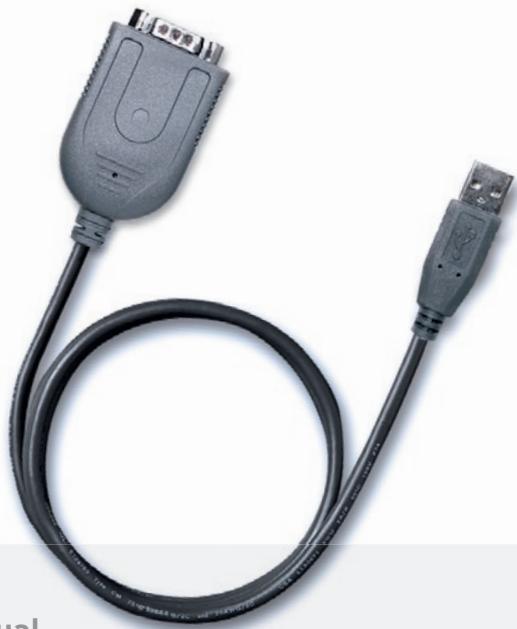
User Manual
F5U103vea
EN 3
FR 9
DE 15
NL 21
ES 27
IT 33


BELKIN
USB Serial Adapter
Connect your Serial Device through USB
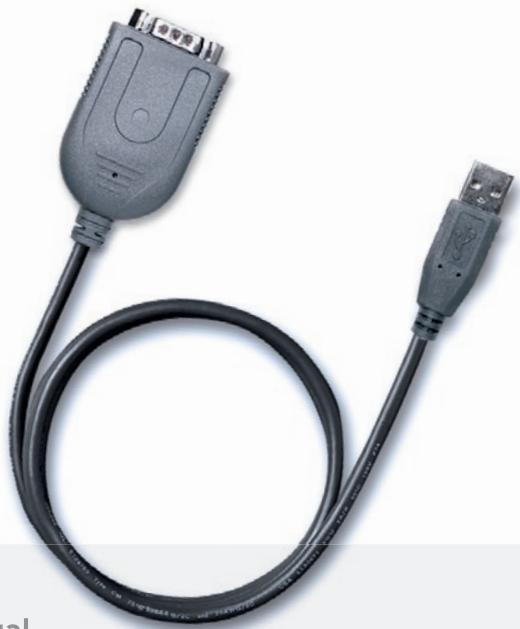
User Manual
F5U103vea
USB Serial Adapter
1. Features :
Fully Compliant with USB Specification v1.1
Supports RS-232 Serial Interface -
Full-duplex transmitter and receiver (TXD and RXD)
Six MODEM control pins (RTS, TS, DTR, DSR, DCD, and RI) 5, 6, 7 or 8 data bits
- Odd, Even, Mark, Space, or None parity mode
One, one and a half, or two stop bits
- Parity error, frame error, and serial break detection
Programmable baud rate from 75 bps to 6 Mbps
External RS-232 driver power down control
- Independent power source for serial interface
- Extensive Flow Control Mechanism
Adjustable high/low watermark level
Automatic flow control with CTS/RTS
Automatic software flow control with XON/XOFF
- Inbound data buffer overflow detection
- Configurable 512-byte bi-directional data buffer:
256-byte outbound buffer and 256-byte inbound buffer; or
28-byte outbound buffer and 384-byte inbound buffer.
2. System Requirements:
PC system equipped with a free USB port
- Windows 98SE operating system or higher.
3. What Comes with You F5U103vea:
One Belkin USB Serial Adapter
One driver disk
One user's manual
4. Hardware Installation:
Plug the USB connector of the Belkin USB Serial Adapter into your PC.
- Connect the DB9 pin female connector of your serial device into the DB9 pin male connector of the USB Serial Adapter.
5. Driver Installation:
Your PC system will show "USB Serial Adapter" and and will ask you to install the USB Serial Adapter driver as soon as you connect the Belkin Serial Adapter with the connected serial device to the USB port of your computer or hub.
Click "Next" to continue. Select "Search for the best driver for your device (Recommended)" and click "Next" button. Your system will automatically search the related drivers for your USB Serial Adapter.
Choose "CD-ROM (D)" and "Specify a location:
D:\win 98". Click "Next". The system will automatically search the USB Serial Adapter driver from the CD-ROM and copy all files into PC hard disk.
Windows will show you the device name.
Click "Next" to start copying the files
Click "finish" to finalize the driver installation.
6.COM Port Load
Windows will automatically show the message "New Hardware Found" when the driver installation is finalized. Ghe system will now look for an available COM Port and assigns it a number [i.e. USB Communications Port (Com X) if X is the next available Communications Port assigned by your system]
7. Installation Checking
- Go to "My computer" and click
- Go to "Control Panel" and click
- Go to "System" and click
- Click on the "Device Manager" tab.
- Click the "Ports" and check if the USB Serial Port (COM X) exists.
- Please uninstall the existing USB Serial Converter driver from your system if installation process is not completed, and reinstall again.
8. How to uninstall:
Go to "Control Panel"
Choose "Add/Remove programs"
Click on "USB SERIAL Converter device"
Click "Add/Remove"
BELKIN
USB Serial Adapter
BELKIN
www.belkin.com
Belkin Ltd.
Express Business Park
Shipton Way, Rushden
NN10 6GL, United Kingdom
+44 (0) 1933 35 2000
+44 (0) 1933 31 2000 fax
Belkin B.V.
Boeing Avenue 333
1119 PH Schiphol-Rijk, Netherlands
+31 (0) 20 654 7300
+31 (0) 20 654 7349 fax
Belkin Iberia
Avda. Cerro del Aguila 3
Belkin Lifetime Product Warranty
For the life of the product, Belkin warrants that this product shall be free of defects in design, assembly, material, and workmanship (free replacement).
BELKIN
Express Business Park
Shipton Way, Rushden
device" (USB/SERIELL Adapter).
Express Business Park
Shipton Way, Rushden
NN10 6GL, GroBbritannien
+44 (0) 1933 35 2000
+44 (0) 1933 31 2000 Fax
Belkin B.V.
Boeing Avenue 333
1119 PH Schiphol-Rijk
Niederlande
+31 (0) 206547300
+31 (0) 20 654 7349 Fax
Belkin Iberia
Avda. Cerro del Aguila 3
Klik op "Next" (Volgende) om door te gaan. Selecteer "Search for the best driver for your device (Recommended)"
Express Business Park
Shipton Way, Rushden
Haga cli en " Next " para continuar. SeLECTIONE "Search for the best driver for your device (Recommended)"
Express Business Park
Shipton Way, Rushden
Express Business Park
Shipton Way, Rushden
Express Business Park
Shipton Way, Rushden
NN10 6GL, United Kingdom
+44 (0) 1933 35 2000
+44 (0) 1933 31 2000 fax
Belkin B.V.
Boeing Avenue 333